
MyMinesOnline
MyMinesOnline lets you apply for and manage your resource authorities online. You can view details of your resource authority and monitor the progress of your applications or dealings.
MyMinesOnline includes facilities for uploading supporting documents for your application and making your payments online.
All submissions and payments in MyMinesOnline must be completed by (4.30pm AEST) otherwise your application will be considered lodged the next business day.
This guide explains how MyMinesOnline works.
Before you can use MyMinesOnline, you will need to register for MyMinesOnline and become a verified user.
You can also find information about fees for mining and resource authority applications.
If you are already registered for MyMinesOnline, log in here:
For assistance, make an online enquiry with the MyMinesOnline help desk.
User guides and technical support for MyMinesOnline
User guides
Read the relevant guidelines and application guides for instructions on submitting your application with MyMinesOnline.
Technical support and feedback
Monday–Friday 8.30am – 4.30pm AEST (except public holidays)
Phone: +61 7 3199 8133
Make an online enquiry with the MyMinesOnline help desk.
Notifications
Send your contact details to the MyMinesOnline help desk using the online enquiry form to receive updates about mining online services.
Apply for a new resource authority on MyMinesOnline
Once you have registered for MyMinesOnline, you can use it to lodge your new resource authority applications online (except for tender applications and prospecting permits).
Before lodging your application:
- Read the relevant resource authority application guide for details of requirements and the application process.
- If your application requires a separate application form (see list below), complete it, then save it to your computer ready to upload.
- Have supporting documents ready and saved (individually) ready to upload. The application form will detail the required documents.
- Have your credit card details ready if paying by credit card (EFT also available).
Once you have submitted your application, you can use MyMinesOnline to track the progress of your assessment.
The Queensland Government is making changes to the way you lodge environmental authority (EA) applications.
From 8 December 2018, coal and mineral EA applications will no longer be accepted via MyMinesOnline and must be lodged directly with the Department of the Environment, Tourism, Science and Innovation.
Resource authority applications that can be lodged online
You can apply for the following authorities using MyMinesOnline.
An asterisk (*) indicates you can lodge the application using the online form. For other applications, you will need to complete a separate application form and upload it along with supporting documents using MyMinesOnline.
Minerals and coal resource authorities
- Exploration permit minerals*
- Mineral development licence*
- Mining claim*
- Mining lease*
Petroleum and gas
- Data acquisition authority
- Divide a permit – authority to prospect
- Petroleum facility licence
- Petroleum lease*
- Petroleum survey licence
- Pipeline licence
- Potential commercial area
- Replacement tenure for authority to prospect
- Water monitoring authority
Greenhouse gas storage
- Data acquisition authority
- Greenhouse gas injection/storage lease
- Potential greenhouse gas storage commercial area
Geothermal
- Exploration permit geothermal
- Geothermal lease
- Potential geothermal commercial area
Lodge dealings and other activities on MyMinesOnline
Once you have registered for MyMinesOnline, you can use it to lodge most dealings and other activities relating to your resource authorities. Read the list of activities that can be lodged online for more details.
Before lodging your application:
- Have your reference number ready. This could be your permit number or dealing/activity number, depending on the application.
- Check the list below to see if you require a separate application form. If you do, complete it and save it to your computer ready to upload.
- Save supporting documents individually so they are ready to upload. The application form will specify the documents required.
- Have your credit card details ready if paying by credit card. Electronic funds transfer (EFT) is also available.
After submitting your application, you can track the progress of your assessment using MyMinesOnline.
Activities that can be lodged online
You can apply for the following activities on MyMinesOnline. The list headings below match the MyMinesOnline menu items.
An asterisk (*) indicates you can lodge the application using the online form.
For other applications, complete a separate application form and upload it to MyMinesOnline, along with supporting documents.
Apply to renew or surrender a permit
- Renew a permit*
- Total surrender of a permit
Lodge a dealing
- Request a transfer*
- Register a mortgage*
- Register a caveat*
- Register a sublease*
- Release a mortgage
- Remove a caveat
- Terminate a sublease
- Change or transfer a sublease
- Transfer a mortgage
Lodge an agreement, program or plan
- Lodge a later work program*
- Lodge a later development plan*
- Register an agreement*
- Submit a coordination arrangement
Change permit area
- Add excluded land
- Additional surface area
- Partial surrender
- Partial abandonment
- Relinquish land
- Variation of access
Request a change to permit conditions
- Add a mineral or purpose
- Drilling on surface not included in mining lease
- Replacement of instrument
- Variation of permit conditions
Petroleum, geothermal and greenhouse gas storage specific activities
- Amend a petroleum licence
- Amend a water monitoring authority
- Amendment to application
- Amendment to relinquishment condition
- Amendment to work program
- Application for part 5 permission
- Application for production testing
- Change production commencement date for petroleum lease
- Lodge a drilling notice (intention, completion, alteration or abandonment of a well or bore, intention or completion of hydraulic fracturing activities)
- Special amendments to an authority to prospect
Change contact details
- Change primary contact address for permits*
- Change permit holder address*
- Change permit holder name*
Track the progress of your MyMinesOnline application
When you submit an application, it will be checked for completeness and assessed.
You can use MyMinesOnline to track the progress of this assessment.
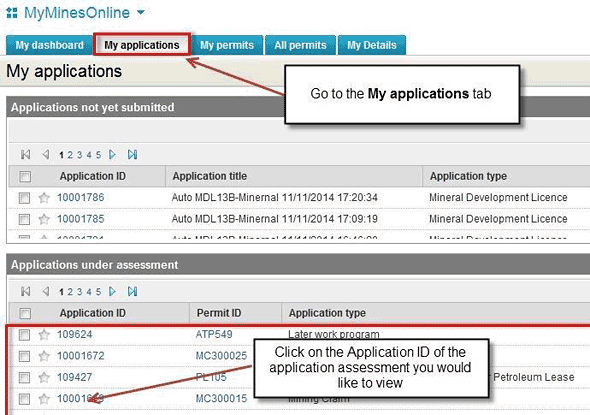
Go to the My applications tab and click on the Application ID of the application you want to view.
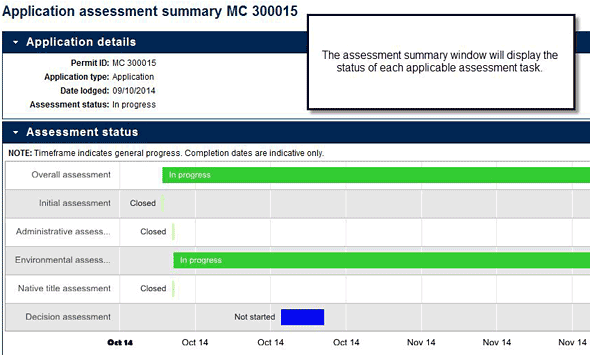
The Applications summary window will display the status of each assessment task.
MyMinesOnline: My applications tab
MyMinesOnline: Assessment summary window
Register for MyMinesOnline
You can register for MyMinesOnline in person or online.
Access to MyMinesOnline is free, but you'll need to provide proof of ID (identification) to get full access.
Make an online enquiry with the MyMinesOnline help desk.
Register and verify
- Visit the MyMinesOnline registration page and enter your details. You will be sent an acknowledgement with a temporary password, please log in and change the password to one of your own choice.
- To be verified and have full access contact the MyMinesOnline help desk for how you can have your identification verified. Make an online enquiry or phone: +61 7 3199 8133.
Certifying documents
If registering online, your ID documents must be certified by an authorised witness. This may include (but not limited to) a:
- justice of the peace
- commissioner for declarations
- police officer
- medical practitioner
- dentist
- pharmacist
- nurse
- school teacher
- state or Commonwealth government employee.
ID documents
You'll need to provide 1 document from list A and 1 from list B.
These documents must be current to be accepted for registration.
List A
- Australian driver's licence
- Australian passport
- Firearms licence
- Foreign passport
- Public service photo ID
List B
- Centrelink card
- Medicare card
- Department of Veterans Affairs card
- Change of name certificate
- Security guard/crowd control licence
- Marriage certificate
- Australian university ID card (less than 1 year old)
- Council rates notice
- Letter from employer
- Electoral roll extract
© The State of Queensland 1995–2026